Triggering an Agent From Google Calendar Events
October 6, 202610 min read2,204 words
Text: Marcus Oyelaran
Scheduled polling and event-driven triggers shape agent speed, reliability.
Connecting an AI agent to Google Calendar is a choice between two fundamentally different execution models, and most people pick one by accident because nobody told them a choice was being made. One model wakes the agent on a schedule. The other wakes the agent only when something actually happens. Those sound like minor implementation details, but they shape everything downstream: how fast the agent reacts, how it fails, and whether it can be trusted to run without someone checking on it.
The stakes are not abstract. An agent that fires at the wrong time, misses an event, or sends the same reminder three times does more damage than having no agent. As a trigger, its accuracy decides whether the actions built on top of it land on time or land too late.
How scheduled polling works at runtime
Polling is the easier model to picture. A scheduler wakes the agent on a fixed cadence, like a daily alarm clock. The agent then calls the Google Calendar API, pulls whatever events sit inside a given window, thinks through what it finds, and fires off whatever action comes next. All of it happens in one straight pass, start to finish, every time the clock goes off.
A reference build from NextLeap's workshop shows the pattern in five parts. A Schedule Trigger kicks things off, set to run daily at 6:00 AM. An AI Agent node handles the reasoning and decides what tools to call. A Google Calendar tool node reaches out and grabs every event on the calendar for that day. Last, a Gmail tool node takes the result and sends it out: a formatted HTML briefing covering the two events the agent judged most important.
How the agent picks those two events matters, and it isn't running down a checklist of keywords someone wrote in advance. The agent decides which two meetings matter most that day and can explain its reasoning, and that's the real gap between this setup and a plain cron job bolted to an API call.
The tradeoff sits in the nature of batch processing itself. The agent has no idea an event exists until its next scheduled wake-up. A meeting dropped onto the calendar at 7:00 AM stays invisible to a 6:00 AM poll until the following morning, unless someone sets up a second poll to catch it sooner. For a morning briefing, an end-of-day report, or any daily summary, a gap measured in hours is fine. For anything that needs to happen right before a meeting starts, or the instant a booking comes in, that same gap turns into a real liability.
Event-driven triggering versus polling at the architectural level
Event-driven triggering flips the whole model around. Instead of the agent waking up on a timer and asking what happened since last time, the calendar system tells the agent the moment something actually happens. The agent only runs when there's a genuine signal to respond to, not on a fixed clock.
AGNT's Google Calendar integration shows this clearly through three separate trigger nodes, each built around a different real-world signal. One, google-calendar-event-starting, fires right as an event is about to begin, which makes it possible to deliver a pre-meeting briefing timed to the meeting itself rather than to some arbitrary point earlier in the day. Building an event-driven agent on AGNT takes about two minutes by the platform's own account, so event-driven setups are just a different shape of the same kind of build rather than an advanced option reserved for bigger engineering teams.
Data handling under this model matters for anyone thinking about privacy. Data stays fully local only if someone chooses local models and local tools; otherwise, external models and APIs receive whatever data the approved operation actually needs. The agent itself runs locally, and that has real consequences for how much of the workflow stays inside the user's own machine versus how much travels out to a third party.
Relevance AI's calendar integration runs the same basic pattern from the platform side. Once that's set, the agent switches on by itself whenever a matching event shows up, with no polling cycle in between.
Webhook-based, serverless builds follow a related but distinct shape. Each call that comes in runs through a full parse-slot-book cycle and finishes cleanly, without carrying any memory into the next call. That makes scaling simple, since there's no ongoing process to manage, but it also means any memory the workflow needs across separate events has to live somewhere outside the agent itself.
Latency, reliability, and failure under load in the two models
Both models can be built well. What separates them in practice is the stretch of time between something happening on the calendar and the agent actually responding to it, and whether that stretch works for the job in front of it.
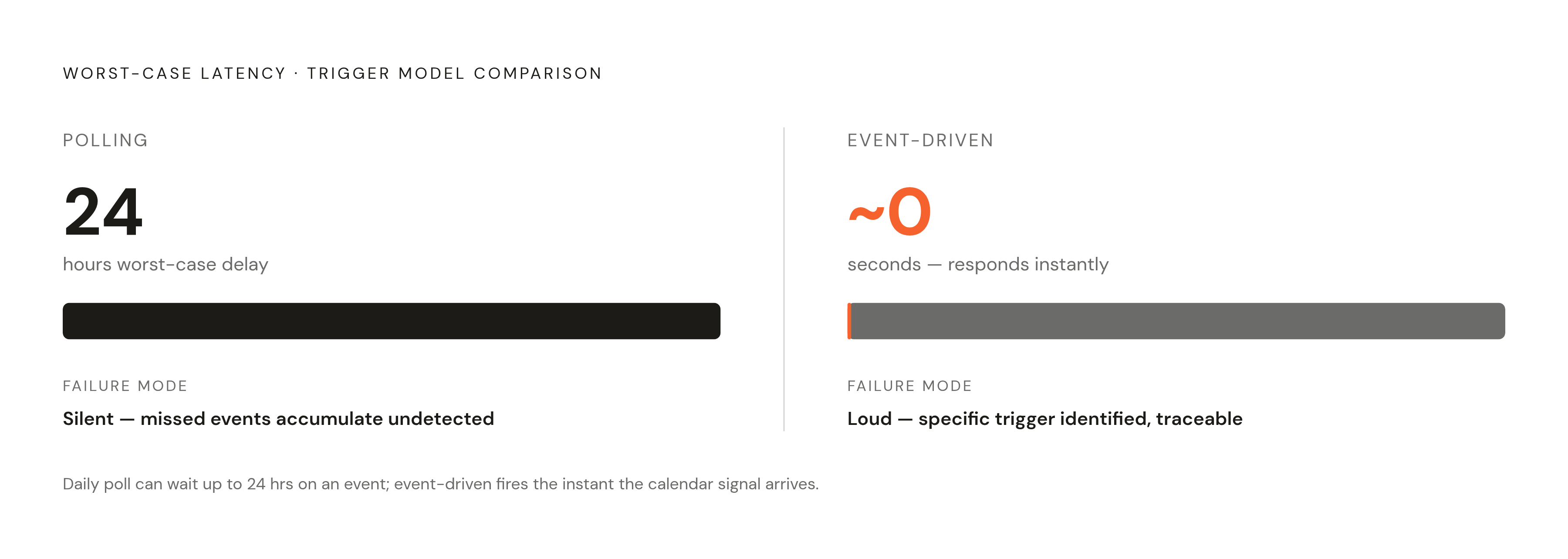
Start with latency. A polling agent's worst-case delay equals its polling interval, full stop. A daily poll can sit on an event for nearly 24 hours before acting on it. An event-driven agent doesn't carry that tax at all: it responds the instant the calendar fires the signal, not on whatever clock a scheduler happens to be running. A full day of delay is fine for a morning briefing bot. That same delay applied to a pre-meeting prep agent defeats the entire purpose of building it.
The two models also fail in different ways. An event-driven agent fails loudly instead. When a webhook breaks or a notification pipeline drops, there's a specific trigger that didn't complete.
Then there's the question of duplicates. Without some kind of deduplication logic built in, that one meeting can generate two briefings or two Slack messages for the same thing. Event-driven agents run into this less often, but they aren't immune: a single meeting edited several times can fire the same trigger several times over, and the agent needs to handle that gracefully, treating repeated edits to one meeting as updates to a single event.
Writes deserve particular caution in either model. One workflow template documentation makes a point of noting that an edge in the flow only orders steps. It doesn't supply a condition, an approval gate, or a field mapping on its own. Those controls have to be added and tested by hand before any write operation goes live. That rule applies no matter which model is running, but it carries more weight in event-driven setups, because writes there happen immediately, the moment the signal fires, with no batch window to catch a mistake before it ships.
Load behaves differently across the two as well. A polling agent's API usage scales with how often it checks in, not with how many events show up, so its load is predictable and easy to plan for. A calendar that generates hundreds of updates in a day produces hundreds of separate trigger invocations, and each one has to be handled cleanly or the whole system starts to choke under its own volume.
Choosing the right model for the job
Matching the right model to a workflow comes down to the latency and reliability that workflow actually needs, not a general preference for one architecture over the other. Polling makes sense whenever the output is a daily or periodic summary, where the exact timing of any single event doesn't matter much, like a morning briefing, an end-of-week report, or a nightly batch update to a CRM. The common thread: if the acceptable lag between a calendar change and the agent's response is measured in hours, polling covers it without extra engineering effort.
Event-driven fits a different shape of problem. It belongs wherever the agent has to act relative to the event itself: minutes before a meeting starts, the instant a new booking lands, or the exact moment a maintenance window begins. Anywhere the downstream action carries a real time constraint, like a pre-meeting Slack briefing that's useless if it lands after the meeting has already ended, event-driven is the only model that actually does the job. The same goes for any case where the calendar functions as a trigger for a broader business process.
Neither model has to work alone. A polling agent can handle the daily summaries and the aggregate reasoning, while a separate event-driven agent handles the time-sensitive reactions to individual events, and both can run in the same stack without stepping on each other. One practical signal for making the call: if an interval keeps getting shortened to chase lower latency, down to every few minutes or even every minute, the workflow actually wants to be event-driven. Polling at that frequency is just event-driven architecture with extra API calls and less reliability built in.
What the agent can do once the trigger fires
The trigger only starts things off. The real payoff of a calendar-connected agent is the chain of actions it sets in motion across email, CRM tools, project boards, and messaging platforms once that trigger fires.
Pre-meeting preparation is one of the clearest patterns. The google-calendar-event-starting trigger fires a few minutes before a meeting begins, and the agent pulls together CRM records, open support tickets, or recent email threads tied to the attendees, then drops a short briefing into a Slack DM. Whoever's walking into that meeting arrives with the context already sitting in front of them. Relevance AI's platform supports this directly by letting someone set an advance notice period on the trigger, so the agent can be configured to fire some number of minutes ahead of the event or right at the start, depending on how much prep time the workflow actually needs.
Meeting creation follows a similar two or three-step shape. When a new event gets added to the calendar, the agent reads the event details, generates an agenda, schedules a Google Meet link, and writes that link back onto the calendar entry. Latenode's multitool assistant extends this further by combining natural language input with web search, calendar scheduling, and email drafting in one single call, so a request like "schedule a meeting and send a follow-up email" resolves in one pass.
The chain doesn't have to stop when the meeting does. Once an event ends, the agent can send out a summary email, open follow-up tasks in a project tool, or update a CRM record, so the meeting isn't really finished until that downstream record exists. The same logic extends to operational, event-type triggers that have nothing to do with personal scheduling at all: a "Customer Kickoff" event getting scheduled can generate onboarding tasks in a spreadsheet automatically, and a "Maintenance Window" starting can notify IT and pause alerts without anyone lifting a finger. In both cases, the event type itself is the condition, and the agent's job is simply to start the correct operational response.
For teams testing the waters, the simplest possible version of this is calendar-to-Slack: a new or modified event gets detected, the agent summarizes it, and that summary lands in a specified Slack channel. It's a small, low-friction build, but it proves the whole loop end to end, which makes it a sensible first project for any team sizing up calendar-triggered automation for the first time.
Security and credential handling for calendar-connected agents
None of this matters if the credentials behind it aren't handled with real care. Calendar data touches meeting attendees, topics, timing, and often the contents of linked emails or CRM records, so an agent with calendar access effectively holds a map of who talks to whom and when. Treating that access casually is what kills otherwise solid automations before they ever reach production.
Credential storage is the first layer. In AGNT's local model, credentials sit inside the operating system's encrypted keychain on the machine running the agent, rather than inside a plaintext config file or a hardcoded string somewhere in a script. That keeps the credentials themselves off the open internet, but it doesn't automatically keep the data private. Anyone building a calendar agent needs to know, concretely, which pieces of a given workflow stay on the machine and which pieces leave it, rather than assuming "local agent" means "all data stays local."
Write operations deserve their own scrutiny, separate from read operations. A general-purpose action node that can create, update, or delete calendar events carries far more risk than one that can only list or read them, since a bad decision there doesn't just misinform someone, it actively changes a shared calendar that other people depend on. Before any agent is allowed to write to a calendar on its own, someone needs to build in explicit checks: a condition that confirms the action makes sense, an approval step for anything consequential, and a clear mapping of which fields the agent is actually allowed to touch.
Prompt injection is the risk specific to agents that read calendar content and reason over it. An event title or description is just text, and an agent instructed to reason over titles and descriptions will read whatever's written there, including text deliberately crafted to look like an instruction. Any calendar agent reasoning over event content needs to treat that content as data to evaluate rather than as commands to follow, and that distinction has to be built into the agent's design from the start.