
Syncing Agent Task Output to a Notion Database
October 2, 202611 min read2,371 words
Text: Maya Petrova
Notion's new Developer Platform makes it a viable target for agent output at scale.
Syncing AI agent task output to a Notion database used to be a workaround.
Why Notion became a viable agent output target
For most of Notion's history, getting agent output into a Notion workspace meant one of two paths. Either a team bolted on third-party automation tools like Zapier or Make, or it ran its own infrastructure against the Notion API. Neither path was built with agent output in mind. Zapier and Make were built for human-triggered workflows between apps, and the raw API gave a team power without a runtime, so someone still had to host, monitor, and patch the server doing the work.
That changed on May 13, 2026, when Notion launched its Developer Platform. The move repositioned Notion from a productivity workspace into a programmable, agent-ready operating system, introducing Workers, the External Agents API, and Database Sync simultaneously. These features landed together, as part of a change in what kind of software Notion is.
By July 1, 2026, release 3.6 added External Agents, letting teams bring Claude and Cursor into a shared workspace board as first-class participants rather than bolted-on integrations. An agent built by Anthropic or by Cursor could now sit on the same board a human teammate uses, with its own presence and its own permissions, not a webhook silently updating a page from outside.
The practical result for anyone building an agent-powered product in 2026: there are now three distinct plumbing paths for getting agent output into Notion, and each one suits a different architecture. Picking the wrong one does not just cost engineering hours. It produces a workflow that looks fine in testing and fails quietly once real volume hits it. The rest of this piece is about telling the three apart, and about matching each one to the agent actually being built.
What the three mechanisms do
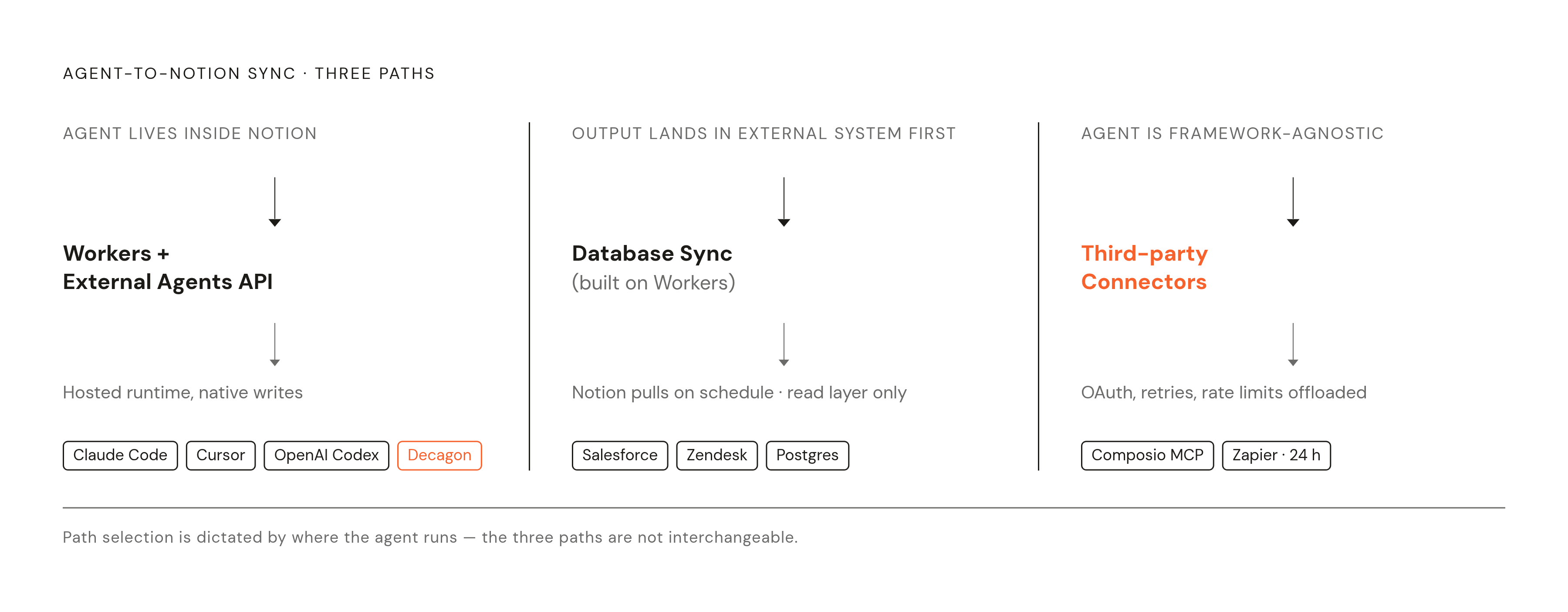
The three paths are not interchangeable alternatives sitting on a menu. Each one answers a different question: where does the agent live, how often does it produce output, and what form does that output take.
The first mechanism is Notion Workers paired with the External Agents API. Workers is a hosted, sandboxed JavaScript and TypeScript runtime that runs inside Notion's own infrastructure, so there's no need to stand up AWS Lambda, Vercel, or any self-managed server to run the code. A Worker can start in three different ways: as a callable tool attached to a Custom Notion Agent, through an inbound webhook URL that an external system posts to, or on a schedule as a Database Sync provider. Each trigger fits a different shape of agent. Alongside Workers sits the External Agents API, now in public beta, which lets outside agents like Claude Code, Cursor, OpenAI Codex, and Decagon operate inside a Notion workspace as full participants, each with its own configurable permissions over pages, databases, Slack, Mail, Calendar, and MCP integrations. This combination fits agents that already live inside Notion, or teams willing to run their agent logic through Notion's own hosted runtime and keep execution on the platform.
The second mechanism is Database Sync. Built on top of Workers, Database Sync pulls live records from external systems, Salesforce, Zendesk, a Postgres database, directly into a Notion database, replacing the old export-transform-import cycle teams used to run by hand. Notion calls the Worker on a set schedule or on demand, the Worker fetches from the external API, and Notion updates the database to match. The connection stays live without anyone re-running a script. This path suits agents whose output lands first in an external system of record, a CRM, a ticketing platform, a database, and only needs to surface in Notion afterward, as a read layer a non-technical team can look at without touching the system of record itself.
The third mechanism runs through third-party connector platforms, chiefly Composio and Zapier. When Notion is set up as an agent data source in Zapier, it syncs data automatically every 24 hours, with a manual sync option available before running a workflow. Composio takes this further with its MCP Gateway, giving agents one standardized endpoint for every tool call, compatible with Claude, Cursor, OpenAI Codex, and other frameworks, and handling OAuth flows, token refresh, rate limits, retries, and error handling on the agent's behalf. All the integration plumbing gets absorbed into the platform instead of sitting in the builder's own code. This path fits agents built outside Notion entirely, ones that need to write structured output to a Notion database without anyone on the team managing API auth or connection maintenance by hand. The most capable agents working this way handle full CRUD on Notion databases: generating structured documents from research and saving them with the right properties attached, updating project status pages from tools like GitHub or Jira, and creating new entries straight from trigger events.
Matching the mechanism to the agent's architecture and output type
Three questions settle which mechanism to use: where the agent runs, how often it produces output, and whether that output needs to trigger something further inside Notion or simply get logged there.
When the agent already lives inside Notion, as a Custom Agent or as an External Agent through the External Agents API, Workers as Agent Tools is the natural fit. The agent decides when to act, the Worker runs the custom logic, and Notion records the outcome, all without the agent ever leaving the platform. The External Agents API already supports Claude Code, Cursor, OpenAI Codex, Decagon, Warp, Cognition, Flora AI, and Amplitude as named first-class participants, along with others. If the agent in question is one of these, a team can skip building a custom connector.
When the agent lives outside Notion and its output is event-driven, a CI run finishes, a form gets submitted, a deal closes in a CRM, Workers with inbound webhooks is the right path. The external system posts to the Worker's webhook URL, the Worker runs its logic, and Notion creates or updates a database entry, with no persistent external server needed to keep the connection alive. A CRM pushing a new deal into a Notion pipeline database, or a CI system opening a Notion incident page the moment a build fails, are the clearest working examples of this pattern.
When the agent lives outside Notion and its output lands in a third-party system of record first, Database Sync is the right mechanism, so long as the goal is giving a team a live Notion view of data that already runs in Salesforce, Zendesk, or Postgres. Database Sync builds a read layer. It gives non-technical teams operational visibility without pulling them out of Notion, but it does not substitute for a direct write integration when an agent needs to log output in real time.
And when the agent is framework-agnostic, or the builder would rather not manage OAuth flows and token refresh directly, a third-party connector platform like Composio or Zapier is the right call, because the bottleneck there is integration plumbing, not agent logic. Zapier's 24-hour auto-sync works fine for logging that isn't time-sensitive. Composio's MCP Gateway fits better when the agent needs to call Notion tools on demand, as one step in a longer multi-step workflow.
What Notion's new platform does well
Notion's new platform earns its keep as a shared surface for knowledge work, a place where people and agents see the same state and act on it together. It does not do the job of a dedicated automation platform nearly as well, and a builder choosing a mechanism needs to know both halves of that fact.
Cross-functional visibility works well: when a Custom Agent or External Agent updates a project board, drafts a summary, or logs a decision, the whole team sees it in the same place they already work, with no separate dashboard for agent activity. Second, judgment-in-the-loop tasks: meeting notes with speaker labels, first-draft documents, ROI calculators built on the fly, these are jobs built around a human reviewing agent output, and Notion's surface was built for exactly that review step. Third, light integration without engineering time: pulling a Salesforce or Postgres table into a Notion view through Database Sync gives a non-technical team read access to operational data without anyone building a custom internal tool from scratch.
Four things fall short. Reliability guarantees are thin: a dedicated workflow platform gives retries, dead-letter queues, execution logs that stay auditable months later, and alerting when something fails silently, while Notion's agent layer is built around a human noticing something looks off, not around guaranteeing a step actually completed (compare with the limitation at issue). Complex branching logic gets unwieldy fast: multi-step conditional workflows with dozens of decision points across several external systems strain a tool built around documents and boards rather than a visual execution graph. Cost climbs with volume: starting October 15, 2026, Workers will require Notion credits, priced at roughly $0.0023 per run, a cost that's manageable at a few hundred syncs a day and significant once an agent fires a Worker on every CRM update, form submission, or inbound message across a growing team. And ownership of the system of record doesn't move: a CRM, inventory system, or finance stack still needs a home that owns the data, with Notion serving as a view layer on top of it rather than a replacement for the system generating it.
Analysts said the May release gives Notion a bigger role to play in enterprise software stacks, provided it can meet CIO expectations around governance and production use, a condition that remains open.
Security and access control when agents write to Notion databases
The permission model governing agent writes to Notion carries more weight than it looks like it should, because an agent holding broad workspace access can do real damage fast, and Notion's default setup is tighter than most builders expect going in.
Notion's permission model enforces a narrow scope by default. The Notion API only reaches the pages and databases explicitly added to the integration during setup, so the agent can't see the rest of the workspace unless someone deliberately opens that door, which puts Notion among the more permission-transparent integrations available. Custom Agents carry their own permissions, set page by page and app by app, rather than inheriting whatever access the creating user happens to hold. An agent writing to a project database can't read the HR wiki next to it unless someone grants that access on purpose.
That workspace-level control solves one problem. It does not solve the problem of what happens inside the agent's own execution environment. MCP lets agents discover and call tools dynamically, and a compromised or malicious MCP server can respond to that discovery with a payload built to capture credentials straight out of the agent's environment. An agent running unsandboxed exposes its environment variables, including API tokens and database connection strings, to exactly that kind of payload.
The stakes aren't abstract. In late January 2026, researchers at Wiz found an exposed Supabase API key sitting in front-end JavaScript code on the Moltbook platform, a key granting full read and write access to production data. The exposure reached millions of API authentication tokens, tens of thousands of email addresses, and private messages exchanged between agents.
Notion's permission model and infrastructure-level isolation solve two different problems, and a production system needs both. Workspace permissions govern what an agent can read and write once it's inside Notion. They do nothing to stop credential leakage or state bleeding from one user's agent run into another's at the infrastructure level. For any operator running a multi-tenant product, where each customer's agent writes to its own separate Notion database, per-user sandboxing at the hosting layer, one isolated, persistent agent environment per customer, is the architectural piece that has to sit alongside Notion's workspace controls, not instead of them. Managed agent hosting platforms that give each user an isolated container, with API keys running directly from that container to the model provider under a bring-your-own-key setup, close the gap Notion's permission model leaves open at the infrastructure layer.
Building a production Notion sync for an agent-powered product
Putting any of these three mechanisms into production starts with naming, honestly, where the agent runs and who owns the credentials that let it act.
An agent living inside Notion through the External Agents API needs its permissions configured deliberately, page by page and app by app, before it ever touches a live database. That configuration work happens once, up front, and it's the single biggest factor in whether the agent stays contained to the work it's meant to do.
An agent triggering Workers through inbound webhooks needs a webhook URL that only the intended external system knows about, and it needs the Worker's logic built to handle malformed or unexpected payloads gracefully, since anything posting to that URL will get processed.
An agent relying on Database Sync needs a clear answer to one question before setup starts: is this a read layer for a team that needs visibility, or does something in the workflow actually need to write back to the system of record? Database Sync solves the first problem well. It was never built to solve the second, and treating it as a write path causes silent failures that appear in production once volume climbs.
An agent running through Composio or Zapier needs its OAuth scopes reviewed the same way the Notion API scopes get reviewed, narrowly, and on purpose. The appeal of these platforms is that they absorb auth, retries, and rate limits, but absorbing that complexity doesn't mean it stops existing. It means someone configuring the integration needs to trust the platform's defaults, or go in and set tighter ones.
And any team building a multi-tenant product on top of these mechanisms needs the infrastructure-level isolation that Notion's own permission model doesn't provide: one agent environment per customer, running in its own container, with its own credentials, so that nothing from one user's run carries into the next. Notion's May 2026 platform gave builders three real paths into a production-grade sync. The mechanism chosen determines how the integration behaves, and that choice has to get made with the agent's actual architecture in view, not with whichever path looked easiest to wire up first.