
Cron Syntax for Solo Operators Who Have Never Written a Schedule
October 15, 202610 min read2,158 words
Text: Priya Nambiar
Learn cron syntax in 30 minutes to schedule, audit, and migrate any agent independently.
Cron is the scheduling language underneath every recurring agent task you will ever set, whether you type it or click it. A solo operator who learns to read it once can set, audit, and migrate any agent schedule on any platform without touching a server or asking for help. This article teaches the syntax from scratch, anchored in the scheduling decisions an agent-powered operator actually faces.
Why cron still matters when your agent does the work
If you run AI agents on a schedule, you cannot avoid cron syntax. The interface may hide it behind a friendly form, but the expression is still there, waiting to be read when something goes wrong. The practical payoff for a solo operator is substantial. That means no more guessing why a job did not fire, no more waiting on support, and no more rebuilding schedules when you switch vendors.
The syntax itself is not hard. Five fields, a handful of characters, and a dozen patterns you already recognize from your own workflow decisions. Thirty minutes gets you there.
The five fields every cron expression is made of
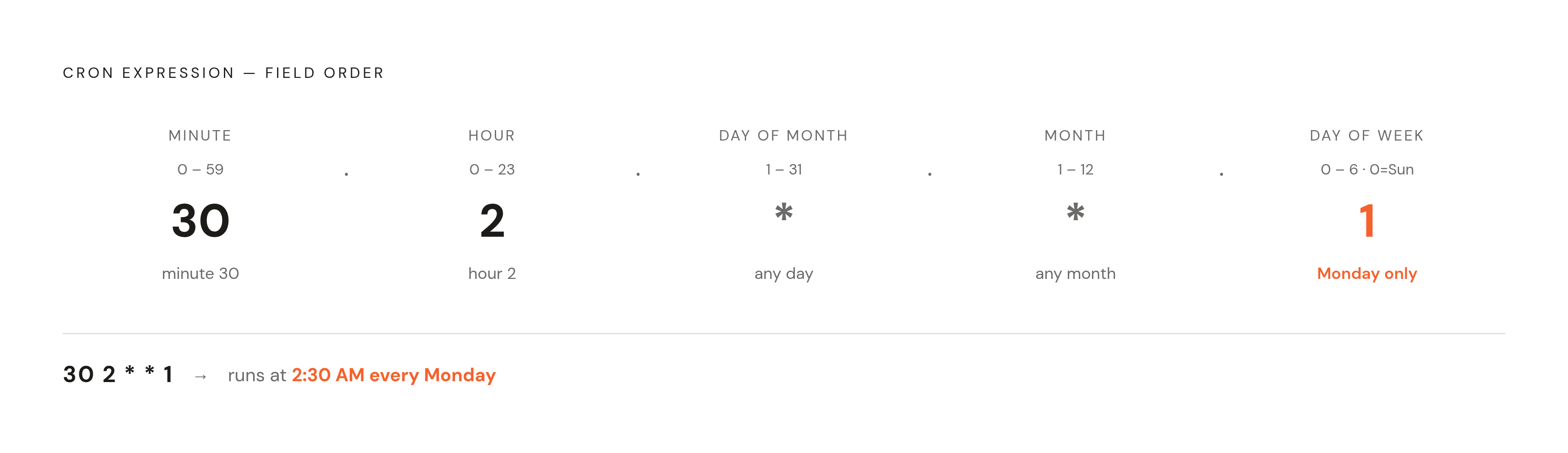
A standard Unix cron expression has five fields you read left to right, then a command. The fields are minute, hour, day-of-month, month, and day-of-week. Some implementations add seconds or a year field, but the five-field form is the one you will meet almost everywhere.
Each field has a fixed range. Minute runs 0 through 59, marking the minute of the hour. Hour runs 0 through 23 in 24-hour format, where 0 is midnight. Day of month runs 1 through 31. Month runs 1 through 12, or JAN through DEC where names are accepted. Day of week runs 0 through 6, or SUN through SAT, and both 0 and 7 are Sunday on standard Unix cron.
The asterisk is the wildcard meaning every possible value in a field. Five asterisks fires the job every minute of every hour of every day. Read left to right, an expression like 30 2 1 means at minute 30, hour 2, any day of month, any month, on Monday. That is 2:30 AM, Mondays only.
The four special characters that make a schedule precise
Four characters handle most scheduling patterns you will ever need as a solo operator. They are the asterisk for every, the comma for lists, the hyphen for ranges, and the slash for steps. The comma separates a list of values. Writing 1,15 in the day-of-month field means the 1st and the 15th. Writing 1,3,5 in the day-of-week field means Monday, Wednesday, and Friday.
The hyphen expresses a range. Writing 9-17 in the hour field means every hour from 9 AM through 5 PM. Writing 1-5 in day-of-week means Monday through Friday.
The slash expresses a step value. Writing /10 in the minute field means every 10 minutes. Writing /2 in the hour field means every two hours. Ranges and steps combine. The expression 1-20/2 runs every two minutes during the first twenty minutes of each hour, which is useful when you want burst checks during a reporting window. A few advanced characters exist: L, W, #, and?. A solo operator on a standard Linux-based agent host should not rely on them.
Shorthand aliases for the schedules operators use most
Standard cron ships with preset aliases that replace entire five-field expressions for the most common agent cadences. @hourly is equivalent to 0 and runs at the start of every hour. @daily and @midnight are equivalent to 0 0 and run every day at midnight. @weekly is equivalent to 0 0 0 and runs once a week at midnight on Sunday. @monthly is equivalent to 0 0 1 and runs on the first of every month at midnight. @yearly and @annually are equivalent to 0 0 1 1 and run on January 1st at midnight. The catch is that aliases only cover the most common cadences. That is why the previous two sections are not skippable.
Twelve expressions mapped to the tasks an agent operator actually schedules
The fastest way to learn cron is to read expressions that match tasks you already intend to run.
| Expression | Schedule | Agent use case | |---|---|---| | 0 6 | Every day at 6 AM | Morning intelligence briefing before the workday | | 0 7 1-5 | 7 AM weekdays only | Morning briefing on workdays | | 0 5 | 5 AM daily | Content or SEO audit at low-traffic hours | | 45 5 | 5:45 AM daily | Follow-on agent that processes the audit output | | /15 | Every 15 minutes | Health-check cadence | | /30 9-18 | Every 30 minutes, 9 AM to 6 PM | Order-monitoring or CRM-sync agent during business hours | | 0 0 0 | Sunday at midnight | Weekly summary report | | 0 0 1 | First day of every month | Monthly financial or performance report | | 0 9-17 1-5 | Every hour, 9 AM to 5 PM, weekdays | Business-hours-only agent activity | | 30 8 1,3,5 | 8:30 AM Monday, Wednesday, Friday | Multi-day cadence for reminders or pushes |
Two pairings deserve attention. That second job is 45 5 . The pattern shows how two scheduled agents chain together on a tight timeline. The health-check and business-hours entries cover the other common need: an agent that runs frequently but only when it is useful. /15 keeps a heartbeat going all day. /30 9-18 concentrates that checking into the working day.
Three mistakes that silently break a scheduled agent job
A cron expression can be perfectly formed and still produce no output. The three most common failure modes are invisible until you know to look for them. The first is relative paths. Cron executes in a stripped-down shell environment with a minimal $PATH, so commands that work in a terminal fail silently in cron. The fix is to always use absolute binary paths. Write /usr/bin/python3 /opt/app/script.py, never python3 script.py. Setting PATH=/usr/local/bin:/usr/bin:/bin at the top of the crontab also works.
The second is timezone mismatch. Cron runs on the system clock, which is usually UTC in cloud environments. A job written as 0 9 * intending 9 AM New York time fires at 9 AM UTC, hours earlier. The fix is to check the server's clock with timedatectl, and on modern systems set TZ=America/New_York in the crontab to override.
The third is missing environment variables. Cron does not load ~/.bashrc or user profile files, so environment variables an agent relies on, like API keys set in a shell profile, are not available. The fix is to source /etc/profile at the top of the script, or declare needed variables explicitly in the crontab file. When a job fails silently, check /var/log/syslog for lines tagged CRON. A failed run with a log is a fix.
What cron cannot do — and the one production rule that fills the gap
Cron's minimum resolution is one minute. It is structurally incapable of firing a job more frequently than once per minute, which matters when an operator wants near-real-time agent responses. That is a hard floor, not a configuration choice.
The overlap problem is more insidious. If a job takes longer than its interval, say an LLM call that hangs or a big file still being processed, the next cron trigger starts a second instance before the first one finishes. Two agents begin writing to the same state. The fix is to wrap the job with flock -n /tmp/lock cmd to prevent overlapping runs.
The production rule for AI-agent jobs specifically follows from this. LLMs can hang indefinitely on a hung API call. Without a hard timeout, a stuck process consumes credits and blocks subsequent runs. Always wrap scheduled agent calls in a strict timeout. This is the single most important addition to a working cron job that runs an agent.
How named agent platforms expose cron scheduling to operators today
Every major agent platform in 2026 either exposes raw cron syntax or accepts natural-language schedules that compile to cron expressions. Operators who understand the underlying format can customize, debug, and migrate across any of them. OpenClaw runs scheduled autonomous tasks by default in isolated sessions separate from the main conversation history. Never spawn sub-agents from a cron job. Keep each job self-contained.
Hermes Agent from MindStudio accepts both raw cron syntax and natural-language schedule descriptions. The phrases "every weekday at 9am", "every Monday and Thursday at 6pm", and "every hour during business hours" are accepted directly and translated internally. A documented production example runs a fleet of cron jobs managing a multi-site publishing network, content publishing, system monitoring, and data pipelines, with no external cron daemons and no manual intervention.
You can run Claude Code and Codex sessions on a recurring schedule through scheduling platforms. Operators review pull requests every morning, scan crash logs nightly, and check dependencies every Monday, and they never write a cron expression manually. The syntax you learned earlier is the same syntax these platforms use or accept, which means the knowledge transfers directly.
Why token expiry makes integration auth a scheduling problem, not just an agent problem
If a scheduled agent fires at 3 AM with an expired OAuth token, it does exactly nothing. The operator wakes up to a missed run, not an error message they can act on. Cron handles the when. The operator still has to handle the credentials the agent needs when it wakes up.
The token expiry math is unforgiving for cron-driven agents. When rotation is enabled, Slack tokens expire every 12 hours, so a twice-daily agent run has to refresh credentials between runs. Google enforces a limit of 100 refresh tokens per user per app, and exceeding it silently invalidates the oldest credential, breaking any agent that was using it.
Composio addresses this as an integration layer purpose-built for AI agents and LLM-driven code. It connects agents to over 1,500 applications, including Gmail, Slack, GitHub, and Notion, through pre-authenticated tools, and handles token refresh automatically across all scheduled runs so the operator never writes an OAuth flow. As of August 2026, Composio's catalogue lists over 1,000 toolkits exposing tens of thousands of individual tools, with SOC 2 Type II attestation and ISO 27001:2022 certification.
The architectural distinction matters. Composio exposes tool actions as functions, so an agent can call them inside its reasoning loop. It is an integration layer for agent frameworks like LangChain, CrewAI, and AutoGen, not a standalone no-code automation product. That distinction is exactly why it fits the scheduled-agent workflow: the credentials stay valid, and the agent stays the agent.
The three non-negotiable rules for an agent job that runs unsupervised
A cron-scheduled agent running unsupervised at 3 AM needs three properties that pure syntax knowledge cannot give it: a hard timeout, idempotency, and state isolation per run. These are the checklist you apply before your first production deployment. Rule one is that timeouts are mandatory. An LLM call can hang indefinitely on a network issue or a rate-limit event. Without a hard timeout, a stuck process holds open a connection, consumes API credits, and blocks the next scheduled run. Wrap every scheduled agent job in a strict timeout, and measure it in minutes, not hours.
Rule two is idempotency. Design the agent so that running it twice on the same data produces the same outcome and does not duplicate actions. The agent should check whether it already processed a given input before writing, posting, or sending. Every scheduled execution should carry a unique idempotency key, in a pattern like userId_jobId_timestamp, so that if a job is triggered twice, whether by a server restart or a scheduler retry, the second run is a no-op.
Rule three is state isolation per run. If an agent reads yesterday's output to identify today's trends, you have to store its memory outside the job process itself. Each cron invocation should start from a known, clean state and write its results to persistent, isolated storage rather than relying on in-process state that vanishes when the job exits. This is the architectural reason OpenClaw runs each cron job in an isolated session separate from the main conversation history.
What a managed agent hosting platform does with the scheduling problem so a founder doesn't have to
Knowing cron syntax is the foundation, but running a scheduled agent reliably in production for every customer involves a second layer of work that syntax alone cannot address. That layer includes provisioning isolated environments per user, keeping credentials valid across runs, monitoring for silent failures, recovering stuck jobs, and updating the agent binary without breaking running schedules. The correct unit of scale for an agent-powered business is one isolated, persistent agent per customer, provisioned automatically. A managed platform means they are auditing and customizing, not provisioning and recovering. The analogy that clarifies the division of labor is payments. Knowing how the pipes work does not mean you should lay them yourself at scale.