
Setting a Monthly Spend Cap Before Your Agent Runs
September 6, 202611 min read2,546 words
Text: Derek Tran
Uncapped agents burn through budgets in weeks, not months—set limits before the first call.
A monthly spend cap on an AI agent has to exist before the agent makes its first call. Ramp's own data shows average monthly token spend among its customers rose 13x since January 2025, climbing in bursts, each tied to a new wave of adoption. Costs lurch, and nobody watching a dashboard reacts fast enough to a lurch. Waiting for real usage data before picking a number sounds prudent right up until the data exists, because by then the damage already happened.
Here's the mechanism. An agent holds context across a whole session, fires off tool calls, and often hands its output to another agent downstream, which does the same thing again; each step multiplies the one before it. A human checking usage once an hour is checking a number that may have already moved a thousand times since the last glance.
Uber's rollout of agentic coding tools to its engineering org in late 2025 is the clearest public example of what this looks like at scale. Usage roughly doubled within a few months of launch, and by spring 2026, four months into the year, the entire annual AI budget was gone. Uber's CTO said the company was starting over on cost planning, a polite way of saying the forecast broke on contact with reality. A separate enterprise reportedly burned through an enormous sum in a single month after deploying agents with no usage caps at all. Both cases show the same gap: nothing stopped the meter, and nobody built in a moment to react.
What "uncapped" actually means in a production agent
An uncapped agent has no enforced ceiling on four things: token use per session, the number of tool calls it can make on a single task, how many sub-agents it can spin up in parallel, and the downstream actions those calls trigger, like web searches, database reads, or hits to some external service. Nothing tells it to stop, so it keeps going until the task, or the context window, runs out.
Most teams can't even see where the money went, and that's the part worth sitting with. Most teams have a total dollar figure and no idea which workflow, which agent, or which customer drove it. Watching a number tick upward on a dashboard is a different skill entirely from reaching into one customer's sandbox and stopping its next API call before it fires. Teams that treat those two things as equivalent find out the difference during their first real margin crisis.
Coding agents make the unit-cost trap easy to see. A simple bug fix and a complex refactor use the exact same tool and the same developer, but the refactor can cost an order of magnitude more. At real, active use, the leading coding agents run into the hundreds of dollars per developer each month. Scale that across a large engineering team on premium tiers, and the bill reaches five figures a month before any other AI spend even enters the picture. The sticker price of the tool matters less than the number of calls the agent decides, on its own, to make before it hands control back. Nobody prices that in, and it's the part that ends up costing the most.
The three variables a spend cap actually controls
A cap isn't one dial. It has to govern three things that compound together, and missing any one of them leaves a hole the other two can't cover. Most teams cap only token spend and call it done, and token spend is the variable easiest to see, which is precisely why it's rarely the one that sinks people.
Token volume is the most visible cost driver: how many model calls, how long the context, how long the output. It's controllable through per-call limits, routing simpler subtasks to a cheaper model, and pruning context that no longer matters. One team cut its monthly API bill from a five-figure number down substantially just by auditing where tokens went and routing easy subtasks to a cheaper model, with no product changes involved.
Tool call frequency gets missed constantly, because it doesn't show up in the model bill. Every web search, database query, or external API hit costs something on its own, independent of the model doing the reasoning. Agents running in a loop can make dozens of these calls per task without ever being told to stop. A cap that only tracks token spend is watching half the meter. Teams that build their cap around the model bill alone always get surprised by the other half.
Concurrency and session count multiply both of the above. Run five agents at once across five customer sandboxes, and the token problem and the tool-call problem both get five times bigger, simultaneously. The fix is architectural: one isolated agent per customer, each with its own spend ceiling, so a single runaway session can't drain a balance shared by everyone else. Skip that isolation, and one misbehaving session drags down every customer sitting on the same balance.
Think of it as budgeting the meter, alongside the license. The license fee is fixed and known in advance. The meter is what compounds, and it's the part nobody sets a number on until it's too late.
How to define the cap number before you have real usage data
Nobody has enough data yet to forecast anything, so the first cap can't be a forecast. It's a ceiling, set on purpose, that forces the agent to fail safely instead of spending freely.
Start with what the task is worth, not what the model costs. If an agent's output is worth some dollar amount to a customer each month, its cost should be a small fraction of that value, and that fraction gets decided before deployment, not after the first invoice. A workable anchor: if the agent replaces $500 a month in labor, a cap of $50 a month keeps a healthy margin intact even in a worst case.
Single-task costs across coding agents vary widely depending on complexity, and the high end of that range is what matters for planning. Multiply the worst-case per-task cost by the most tasks the agent could plausibly run in a month, and that gives a worst-case ceiling to build around.
Set the first month's cap at whatever amount can be absorbed as a total loss, not at what usage is expected to be. That first month is a calibration period, meant to buy real data rather than run at full scale. Once a month of capped, real usage exists, the next cap gets set from evidence instead of a guess.
Leave room in that number for tool calls specifically. Token spend projections routinely undercount what tool calls actually cost, partly because they don't land in the same line item as the model bill. And write down the reasoning behind the cap: a number with no rationale gets changed the first time someone pushes back on it, while a number tied explicitly to a margin requirement holds up.
Where the cap lives in your stack and what enforces it
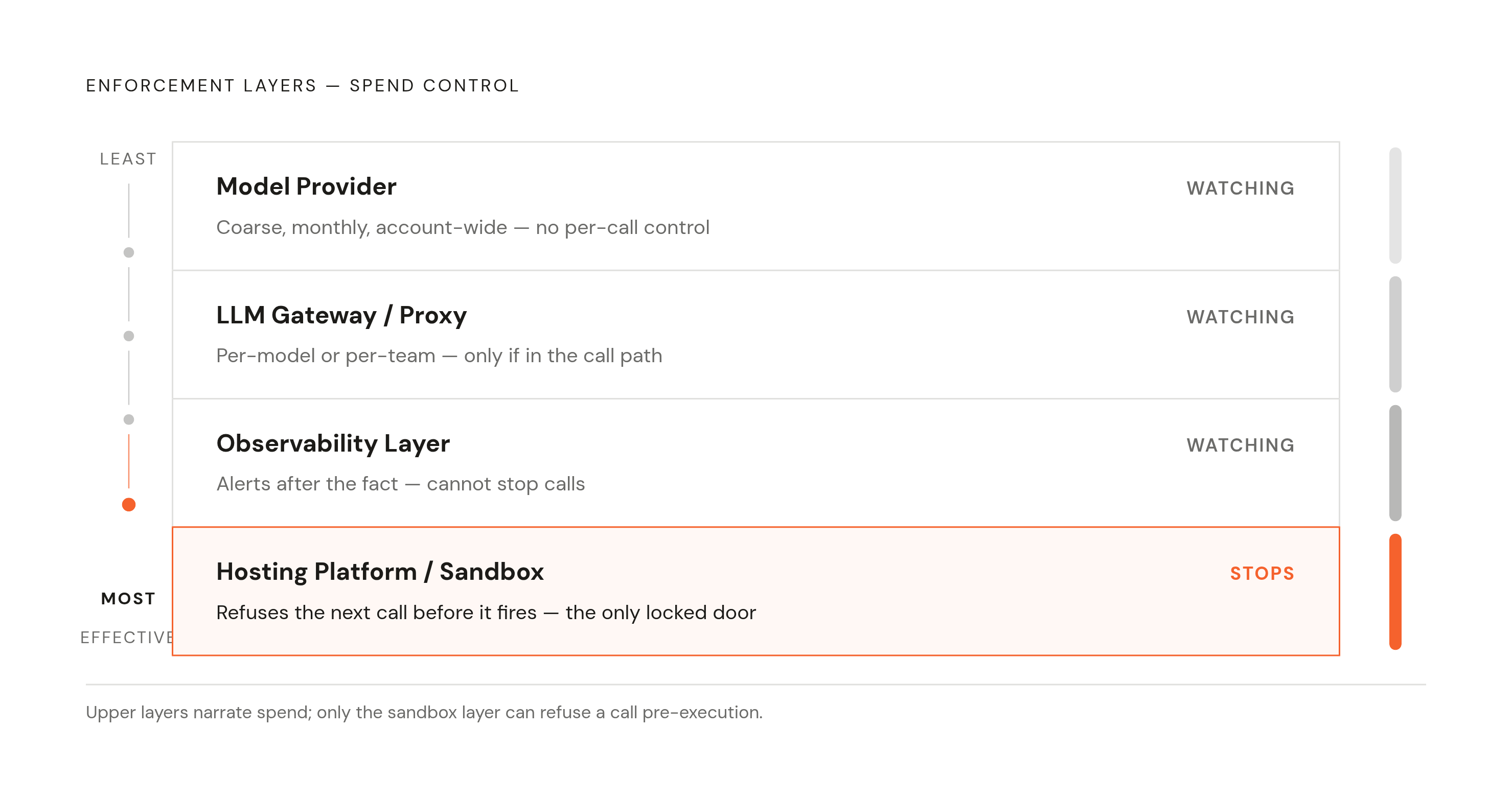
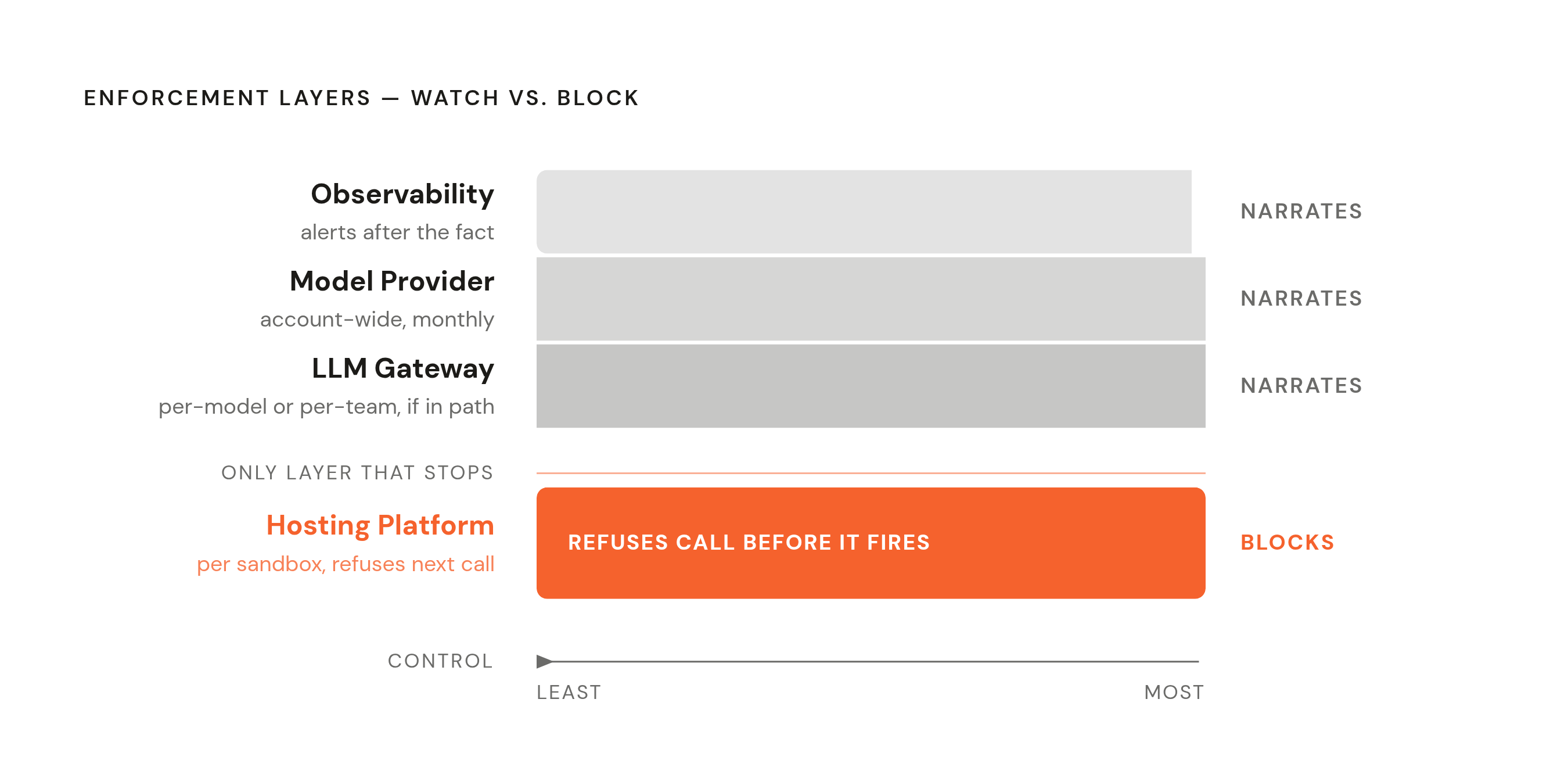
A cap can sit in four different places, and the layer matters as much as the number. Only one of those four can actually stop a call before it fires; the other three are just watching.
At the model provider, limits are coarse: monthly, account-wide, not broken out per customer or per workflow. An LLM gateway or proxy sitting between the app and the model gets more granular, per-model or per-team or sometimes per-key, but only if that gateway sits directly in the call path. An observability layer watches and alerts after the fact, useful for understanding what happened, limited in its ability to stop it in the moment. The hosting platform, enforcing per sandbox, is the only layer that can refuse the next call before it goes out, and that's the correct layer for anyone running one agent per customer.
A soft cap sends an alert once spend crosses a threshold, and the agent keeps running while someone reads that alert. A hard cap refuses the next call outright, closer to a locked door than an email. Most teams reach for the soft cap first because it feels less disruptive, but an alert doesn't stop a loop; it just narrates one.
Postpaid billing makes any cap advisory by default: spend accrues, the invoice shows up weeks later, and by then the number is already what it is. A prepaid balance, metered per sandbox, turns the cap into something structural instead of a policy. The balance is real money, and when it's gone, the next call doesn't fire. There's no invoice to dispute after the fact because there's nothing left to charge.
In practice, that looks like this: each customer's sandbox carries its own balance and its own ceiling. Compute meters by the minute while the sandbox runs; model calls, searches, and integration use all draw from that same balance. When the sandbox hits its cap, that sandbox stops, and nothing spills over into any other customer's balance. That's the architecture that contains runaway spend at the level of a single customer. Worth being honest about what a cap can't do, too: it can't catch a malformed prompt that sends the agent into a loop before the cap even triggers. That needs a separate control, a rate limit on calls per minute, running alongside the cap rather than instead of it.
Integrations multiply spend (and must be inside the cap boundary)
An agent wired into Gmail, Slack, GitHub, or a calendar isn't just burning tokens. Every one of those connections fires external API calls, and some of those calls carry their own cost or kick off downstream workflows that do.
Integration trouble is a significant and frequently underestimated reason agents fail in production. Brittle connectors and polling-heavy setups that generate far more calls than the task needs are common culprits, and polling is the sneaky one specifically. An agent set to check for new emails or messages every few seconds can generate hundreds of tool calls an hour with zero user action behind any of them. Nobody asked for that spend, yet it happened anyway, quietly, in the background.
Platforms that offer large libraries of pre-authenticated integrations, Composio's catalog of over 1,000 toolkits and 1,500-plus app connections being one example, solve the credential and OAuth side of this problem. The volume side is a separate matter entirely, and conflating the two is the mistake. However many calls an integration is configured to make, that volume lands inside whatever cap gets set, or outside it if nobody thought to include it. That gap is exactly where operators get blindsided.
Before deployment, list every external service the agent can reach, estimate the worst-case call frequency for each one, and fold those costs into the same per-sandbox cap rather than treating them as a separate line item. Where the integration platform supports it, favor event-driven triggers over polling: a webhook that fires once when something actually changes beats a loop that asks "anything new?" every few seconds regardless of the answer. Managed authentication takes credential risk off the table, but call volume is a separate matter. That's a cap decision that belongs to whoever is building the thing, not the integration vendor.
How to structure caps differently for one-off agents vs. per-customer deployments
There are two very different deployment patterns here, and treating them the same is where most of the damage happens.
The first is a single agent for internal use: a founder running their own workflow, or a team tool with one owner. That needs one cap on one balance, watched by the person who owns it. Set a monthly ceiling tied to what the workflow is actually worth, add an alert at 80% of that number so there's time for a human to look before the agent shuts off. Simple, because there's one balance and one person accountable for it.
The second pattern, one agent per customer at scale, is a different problem entirely, and it's the one that actually breaks companies. Each customer's agent is its own cost center; it has to be capped and recoverable independently of every other one. The operator tops up a prepaid balance, and each customer's sandbox draws from its own slice of that balance with its own hard ceiling. Pricing has to account for this directly: if a customer's cap sits at $20 a month and the operator charges $49 a month, the margin isn't a hope, it's a structural fact built into the numbers. A customer who hits their cap sees their own agent pause, and nobody else's agent even notices.
For white-label operators setting their own prices, the cap isn't just an internal safeguard; it's something customers should see up front. A customer who knows their ceiling ahead of time isn't surprised by a bill later. The right unit of scale for a business built on agents is one isolated, persistent agent per customer, with its own cap provisioned automatically the moment that customer signs up, not configured by hand after the fact once someone remembers to do it.
Industry projections suggest a substantial share of agentic AI projects will be canceled before the end of the decade, with inadequate cost controls cited as a driver. That's largely a Pattern 2 failure: operators who tried to run per-customer agents on one shared, uncapped balance, and found out the hard way what one bad sandbox does to everyone else sharing it.
The deployment sequence: exactly when the cap is set relative to everything else
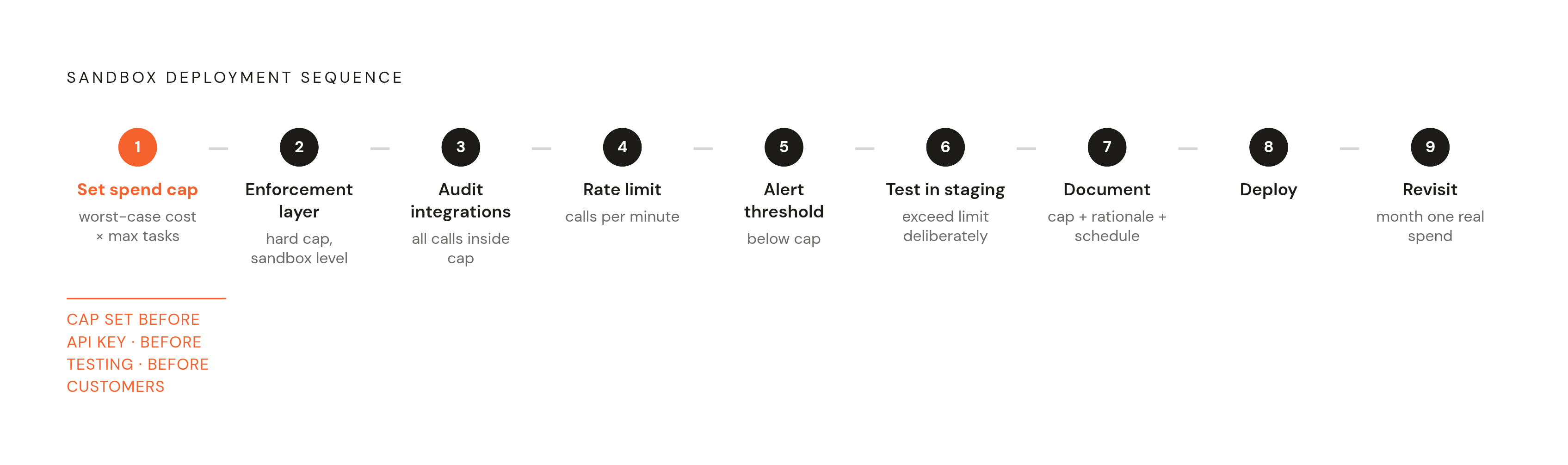
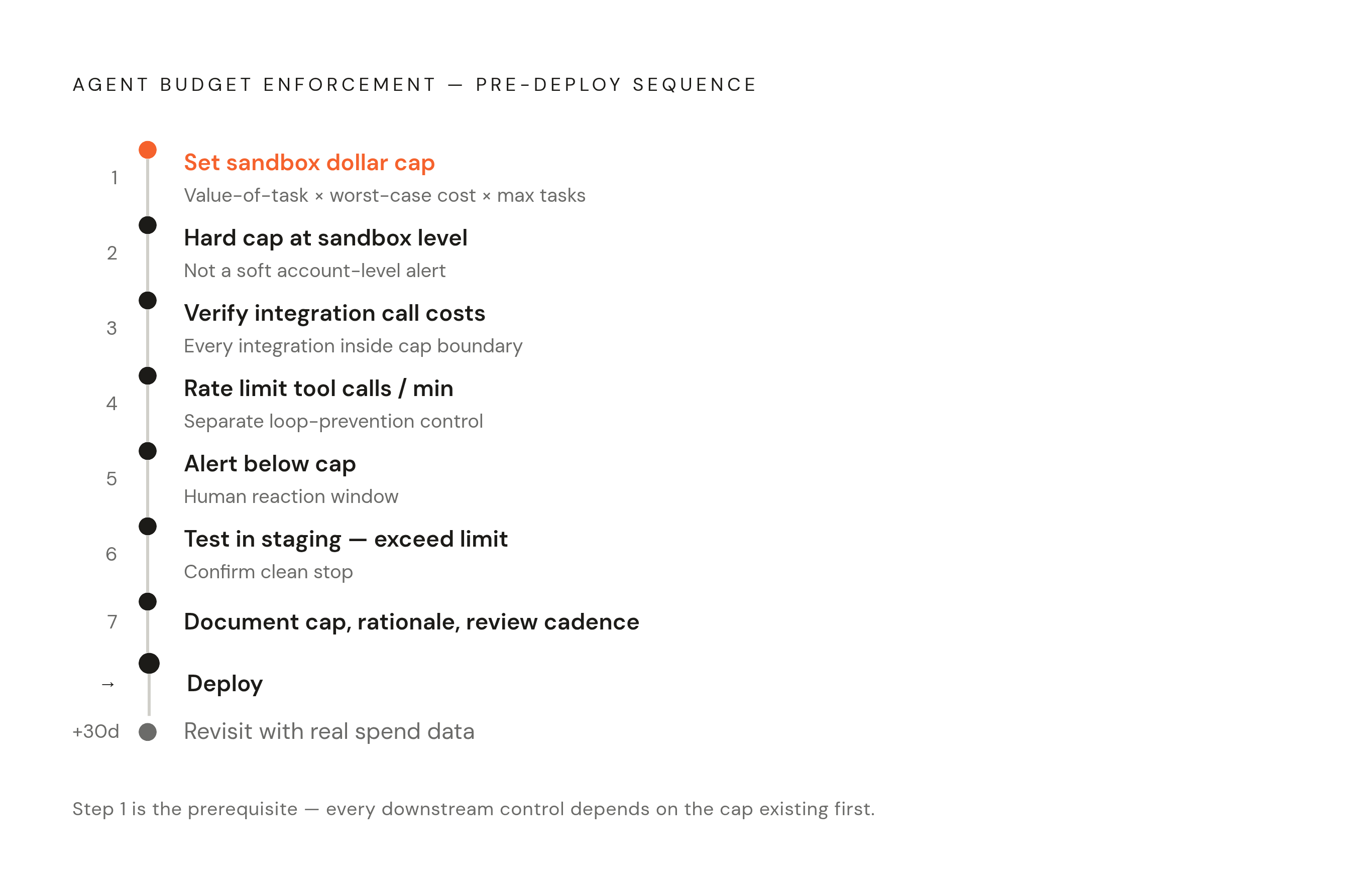
The cap gets set before the first API key goes live, before testing, before the first customer signs up. That order isn't negotiable, and skipping it is the single most common mistake in this whole list.
The sequence runs in order. Define the per-sandbox cap in dollar terms, using the value-of-task anchor and the worst-case per-task cost multiplied by the maximum plausible tasks per month. Pick the enforcement layer, and confirm it's a hard cap enforced at the sandbox level, not a soft alert sitting at the account level. List every integration the agent will touch and check that those call costs sit inside the cap boundary, not off to the side. Set a rate limit on tool calls per minute as a second, separate control against looping. Configure an alert below the cap, not at it, so there's a real window for a human to look before the agent stops on its own. Test the enforcement in staging by deliberately going over the limit and confirming the agent stops cleanly rather than erroring out mid-task. Only then write down the cap, the reasoning behind it, and how often it gets reviewed, and deploy.
After the first month of real usage, revisit the number with actual spend data in hand, and adjust it up or down based on what happened, not on a hunch about what next month should look like.
An agent being "ready" means the cap is set and tested, the enforcement layer is confirmed to actually enforce, and the review process sits there waiting to be used. The cap is what makes it safe to hand an agent to a customer never met in person, running a workflow nobody's watching in real time.